
HubSpot API is a set of protocols and tools that allows external software applications to communicate directly with your HubSpot portal, enabling a smooth data exchange. For B2B organisations, this technical bridge is the foundation of a modern Revenue Operations (RevOps) ecosystem, making it so that your CRM, marketing automation and external databases work well together.
By leveraging these connections, your business can automate repetitive manual tasks, eliminate data errors and build a predictable pipeline based on accurate, real-time reporting. This guide explores how to strategically approach integrations to drive operational excellence and scalable growth.

Key takeaways
- Cross-system data alignment: synchronise HubSpot with external platforms to make sure that records remain reliable as they move between sales, marketing and finance.
- Custom scalability: use custom object data to track unique business requirements that go beyond standard contact or company records.
- Improved security: transition to private app access tokens for secure, granular control over your data integrations.
- Operational efficiency: take advantage of complex marketing automation workflows by triggering actions based on data from external ERP or finance systems.
What is the HubSpot API?
The HubSpot API acts as a translator between your HubSpot CRM and other software in your tech stack. It uses a REST API architecture, which is a standard web service that allows developers to create, read, update and delete information within your portal using a consistent JSON data structure.
The API provides the flexibility needed to build an Allbound engine that supports long industrial sales cycles by pulling high-intent data from various touchpoints into one dashboard. Whether you are managing lead routing or pipeline forecasting, the API makes sure that your strategy is backed by data hygiene and compliance.
An overview of HubSpot integrations
A HubSpot integration is the active connection established between HubSpot and another platform with the aim of sharing information. These integrations typically fall into two categories: native marketplace apps and custom-built API connections. While native apps offer quick setup for popular tools, custom integrations provide the deep, technical delivery required for complex B2B SaaS or industrial environments.
The ultimate goal of any integration is to facilitate CRM data synchronisation in order to reduce friction between departments. By putting your marketing, sales and customer service teams under a shared data architecture, you can provide a better user experience and justify marketing investments through clear ROI (Return on Investment) metrics.
Typical tools integrated via the HubSpot API
To build a fully integrated RevOps infrastructure, most businesses focus on connecting three core types of software.
ERP and finance systems
Connecting your Enterprise Resource Planning (ERP) system to HubSpot is essential for accurate forecasting. By syncing financial data, sales teams can see customer credit limits or invoice statuses directly within the CRM. In parallel, marketing can trigger loyalty marketing automation workflows based on real purchase history.
Data analytics and BI dashboards
Data-driven professionals often require reporting that goes beyond standard templates. The API allows you to export custom object data into Business Intelligence (BI) tools like Power BI or Tableau. This enables you to build custom dashboards that your board understands, showing the direct link between lead-to-revenue growth.
Proprietary databases and legacy software
Many industrial B2B companies rely on 'old-fashioned' legacy systems that do not have native apps. A custom API integration can modernise these legacy processes, pulling valuable historical data into HubSpot to create a clean, efficient environment for modern Allbound sales activity.
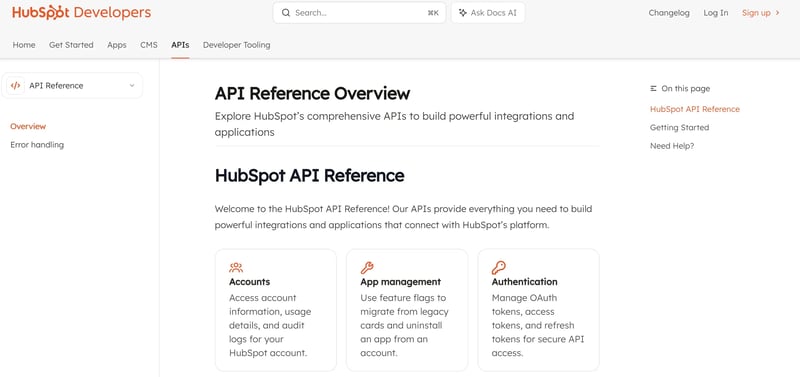
Image source: HubSpot Developers
How to create a custom HubSpot API integration
Developing a custom connection requires a strategic roadmap to ensure technical credibility and long-term scalability.
Step 1: understanding the data requirements
Before writing any code, define which REST API endpoints you need to access. Identify exactly which fields need to sync and the frequency of those updates. This stage must also address data hygiene and compliance, making sure that your integration follows UK GDPR (General Data Protection Regulation) standards by only syncing necessary personal information.
Step 2: setting up a private app in HubSpot
HubSpot has moved away from legacy API keys in favour of private apps. It is important to oversee the creation of these apps within your portal settings in order to generate private app access tokens. These tokens provide a secure way for you to authenticate your integration while also allowing you to set specific scopes, setting it up in a way that only allows the external tool to access the data it truly needs.
Step 3: authenticating and testing endpoints
Once the private app is configured, your technical partner will begin testing the connection using the JSON data structure. This involves sending test 'calls' to specific REST API endpoints—such as the contacts or deals endpoint—to verify that data maps correctly to HubSpot properties and that deduplication logic functions as intended. Structured reporting and weekly touchpoints during this phase are vital to make sure that the project stays on the established timeline.
Conclusion
The HubSpot API is the key to transforming a basic CRM into a powerful RevOps engine that fuels international growth. By focusing on technical excellence and strategic alignment, you can replace manually tedious processes with automated workflows that your leadership team can trust.
At Cyberclick, we specialise in delivering highly technical HubSpot migrations and complex integrations that understand industrial B2B and SaaS requirements. Whether you are looking to clean your data or build a predictable Allbound pipeline, having a reliable partner for both strategy and execution is the fastest way to see measurable results.


Héctor Borrás
Key Account Manager Engineer at Cyberclick. Expert in web application development and system integrations with over 10 years of experience. He holds a degree in Mathematics, a Higher Degree in Computer Application Development, and a Higher Degree in Multiplatform Application Development.



Leave your comment and join the conversation